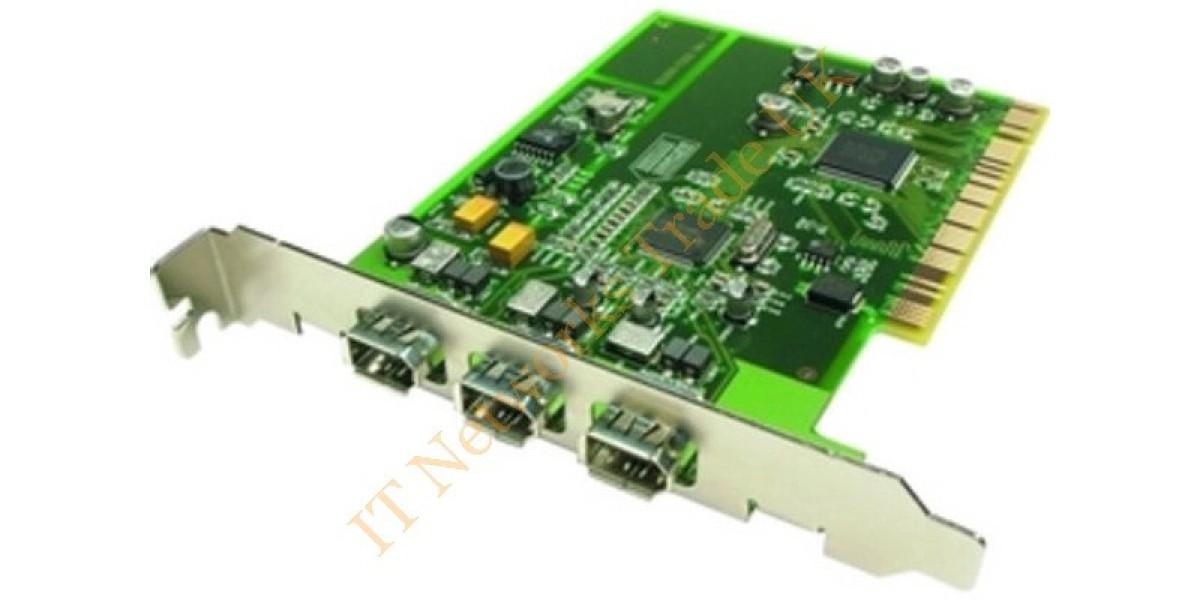

Firewire Devices: Uses, Features, and Compatibility
Connecting electronic equipment is an important part of modern computing. Computers often need to communicate with external storage, cameras, audio equipment, and other devices. Different connection standards have been developed to make these tasks faster and more convenient.
One technology that played an important role in data transfer is FireWire. It became popular among professionals and everyday users who needed a reliable way to connect digital equipment to computers.
Although newer connection standards are now widely available, FireWire remains relevant in certain older systems and specialist applications. Understanding how it works can help users manage existing equipment and make informed decisions when upgrading their setups.
Firewire Devices are electronic products that use the FireWire interface to transfer data between compatible equipment. These may include external hard drives, digital video cameras, audio interfaces, and other peripherals designed around this connection standard.
What Is FireWire Technology?
FireWire is a high-speed serial connection standard developed to support communication between computers and external devices. It is also known by the technical name IEEE 1394.
The technology was designed to provide consistent data transfer and support multiple connected devices. Unlike some older connection methods, FireWire allowed equipment to communicate through a shared connection arrangement.
It became particularly useful in environments where transferring large amounts of digital information was important.
Common Types of FireWire Connections
FireWire has appeared in different versions and connector designs. Knowing the differences can help users identify the correct connection for their equipment.
FireWire 400
FireWire 400, also known as IEEE 1394a, supports data transfer rates of up to 400 Mbps. It commonly uses a six-pin connector, although four-pin versions are also found on some devices.
This version was widely used with digital video cameras, external storage, and other computer accessories.
FireWire 800
FireWire 800, or IEEE 1394b, supports speeds of up to 800 Mbps. It uses a different nine-pin connector and offers improved transfer performance compared with the earlier version.
Some equipment supports both standards through suitable cables or adapters, but compatibility should always be checked before connecting devices.
Where Are FireWire Devices Used?
FireWire technology has served several purposes across different industries. Although its use has declined, some equipment still depends on it.
Digital Video Production
Older digital video cameras often used FireWire to transfer recorded footage to computers. Video editors could capture recordings and move files into editing software through a compatible connection.
Audio Recording Equipment
Some professional audio interfaces and recording devices were designed with FireWire connectivity. These products allowed musicians and recording professionals to connect their equipment to compatible computers.
External Storage
FireWire external hard drives provided another option for transferring and storing digital files. They were useful for backups, media libraries, and moving information between supported systems.
Important Compatibility Factors to Consider
Before purchasing or connecting equipment, users should check whether the computer and peripheral support the same FireWire standard.
The connector shape is one important detail. A four-pin, six-pin, or nine-pin connection may require a different cable. The supported transfer standard should also match the requirements of the connected equipment.
Operating system support is another consideration. Older FireWire products may require specific drivers or compatible software to function correctly.
Users should also check whether their computer has a suitable built-in port or requires an expansion card. An adapter alone does not guarantee compatibility, especially when the computer lacks the necessary hardware or software support.
Are FireWire Connections Still Useful Today?
Modern computers increasingly rely on USB and Thunderbolt connections. These standards offer newer features and are supported by a wider range of current products.
However, replacing older equipment is not always practical. A business may still use a working camera, audio interface, or storage device that depends on FireWire.
In these situations, maintaining a compatible computer setup can be more convenient than replacing the entire system. Users should assess the condition of their equipment, software requirements, and available connection options before deciding.
Finding Suitable Technology Products with itnetworkstrade
When sourcing computer components and connectivity equipment, itnetworkstrade provides a website where users can explore technology-related products and available information. Reviewing product specifications before making a purchase can help identify equipment that matches existing hardware requirements.
Careful selection is particularly important when working with older connection standards, where compatibility can vary between devices and computer systems.
Visit us:https://itnetworkstrade.co.uk
Common Mistakes When Using FireWire Equipment
A common mistake is assuming that all FireWire connectors are interchangeable. Different versions use different connector designs, so checking the port type is essential.
Another issue is overlooking software support. Even when a cable fits correctly, an outdated driver or unsupported operating system can prevent a device from working.
Users should also avoid assuming that a simple adapter will solve every connection problem. Hardware support, transfer standards, and operating system compatibility all matter.
Checking these details before purchasing accessories can save time and reduce unnecessary costs.
Conclusion
FireWire was an important connection technology for digital video, audio production, and external storage. While newer standards have replaced it in many modern systems, older equipment still makes it relevant in certain situations.
Understanding connector types, transfer speeds, and compatibility requirements helps users work with existing hardware more effectively. Before choosing any related equipment, it is worth checking the technical specifications to ensure everything works together.
Frequently Asked Questions
1. What are FireWire devices used for?
They are used to connect compatible equipment, such as digital video cameras, external hard drives, and audio interfaces, to computers for data transfer.
2. Is FireWire the same as USB?
No. FireWire and USB are different connection standards. They use different technologies, connectors, and compatibility requirements.
3. Can I connect a FireWire device to a modern computer?
It may be possible with suitable hardware and adapters, but compatibility depends on the computer, operating system, device, and required drivers. Check these details before purchasing an adapter.