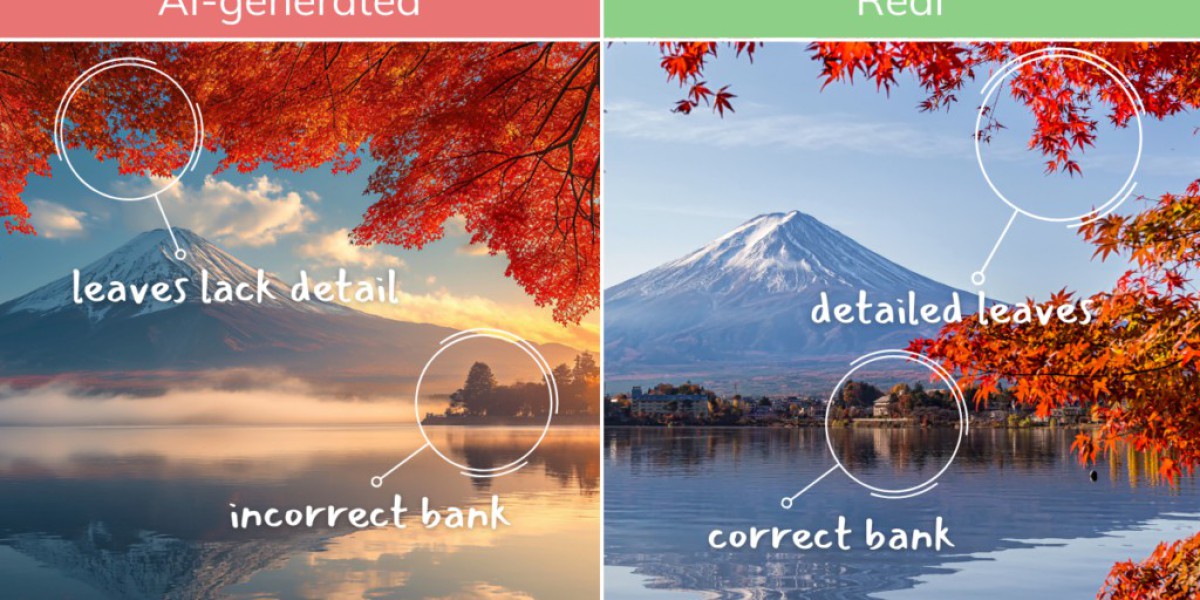

AI-generated images have become increasingly realistic. A picture that looks like an ordinary photograph may actually have been created or heavily modified with an image-generation tool. This creates a simple question for internet users, publishers, marketers, and social media managers: how can you cek foto ai atau bukan?
There is no single visual trick that can identify every synthetic image. Modern AI can produce realistic faces, environments, objects, textures, and even imperfect-looking photographs. A better approach is to combine visual inspection, image information, source research, and dedicated detection technology.
Why Is It Becoming Difficult to Identify AI Images?
Early AI images often contained obvious problems such as distorted hands, strange facial features, unreadable text, or unnatural-looking backgrounds. Those clues can still appear, but they are no longer reliable enough to use as the only test.
Modern generators can create convincing photographs across many categories. Even people can have difficulty distinguishing synthetic images from genuine photographs, particularly when an image has been resized, compressed, edited, or shared through another platform.
This is why image verification should involve several signals instead of relying on one unusual detail.
What Should You Look for When Examining an Image?
A close visual inspection can provide useful clues, although it cannot prove that an image was generated by AI.
1. Examine Text and Small Details
Look closely at signs, labels, clothing, posters, menus, packaging, and other areas containing text.
AI-generated images can sometimes contain:
Misspelled words
Random characters
Inconsistent letter shapes
Text that changes between nearby objects
Symbols that look almost correct but have no meaning
However, newer image models have improved significantly at rendering text, so normal-looking text does not automatically establish that a picture is genuine.
2. Check Lighting and Shadows
Look at the direction of shadows throughout the scene.
If several objects appear to be illuminated from different directions without an obvious reason, the image deserves closer examination. Reflections in mirrors, windows, water, or shiny surfaces can also reveal inconsistencies.
Physics-based details are particularly useful because an image-generation model can create a visually convincing scene without necessarily maintaining perfect consistency between every light source, reflection, and shadow.
3. Inspect Background Objects
Do not focus only on the main subject.
Examine distant people, buildings, furniture, vehicles, trees, signs, and other background elements. Look for objects that merge into each other, unusual architectural structures, repeated patterns, or shapes that do not make physical sense.
Sometimes the most useful clues are located away from the centre of the image.
4. Look at Textures and Edges
Unusual smoothness, repeated textures, strange transitions, or overly consistent surfaces can sometimes indicate synthetic generation.
Pay particular attention to:
Hair
Fabric
Skin
Glass
Metal
Foliage
Complex patterns
Object boundaries
These details are clues, not definitive evidence. Photo-editing software and aggressive compression can create similar visual effects.
Can Metadata Help You Determine If a Photo Is AI?
Yes, but metadata should be treated as supporting evidence rather than a final answer.
Image files can contain information such as camera details, software used, creation information, or other technical data. Depending on the file and workflow, provenance standards such as C2PA can also provide information about how content was created or edited.
When valid provenance information is present, it can be particularly useful because it may provide a record of an image's origin or editing history. However, metadata can disappear when an image is converted, edited, screenshotted, or uploaded to a platform that removes it.
Therefore, missing metadata does not prove that an image was created by AI. Pixel-based detectors can provide another layer of analysis when provenance information is unavailable.
What Is C2PA and Why Does It Matter?
C2PA is a content-provenance standard designed to provide information about the origin and modification history of digital content.
When an image contains valid Content Credentials, users may be able to see information about its creation or subsequent edits. This can be valuable when verifying professional photography, AI-generated media, or edited content.
However, provenance is not universal. Screenshots and many online publishing workflows can remove this information. Therefore, a missing credential should not automatically be interpreted as evidence that an image is authentic or fake.
How Does AI Image Detection Software Work?
Dedicated AI image detectors use machine-learning models to examine characteristics that may not be obvious to humans.
Some systems analyze the actual pixel content of an image rather than depending on metadata or visible watermarks. This can allow detection to continue even when EXIF information has been removed.
Depending on the technology, detection may examine patterns involving:
Pixel-level characteristics
Textures
Image frequencies
Visual inconsistencies
Generation-related patterns
Metadata or provenance signals
Known characteristics of AI-generated content
The result is usually expressed as a probability, confidence score, or classification rather than an absolute statement of truth.
Does a Detector Guarantee That a Photo Is AI?
No.
This is an important limitation that is sometimes overlooked. AI detection technology is improving, but no detector should be treated as an unquestionable authority.
Results can be influenced by image quality, editing, compression, resizing, the generator used to create the image, and whether the system has experience with that type of content. Even leading detection services acknowledge that accuracy can vary and that results should be considered alongside other evidence.
A detector result should therefore be interpreted as evidence, not as a substitute for judgment.
What About Screenshots and Compressed Images?
Screenshots can make verification more complicated.
When an image is screenshotted or repeatedly compressed, metadata and provenance information may disappear. At the same time, the visual characteristics of the original file can change.
Pixel-based detection systems are designed to analyze visual content and may continue to work after common transformations, but image quality can still affect the strength of the result.
For the best analysis, use the highest-quality original file available.
Can Reverse Image Search Help?
Yes. Reverse image searching is another useful verification step.
If you find a suspicious photograph online, search for earlier versions or related copies. You may discover that the image originally appeared on a stock-photo website, an official organization page, an older news article, or another source.
On the other hand, failing to find the image elsewhere does not prove that it was generated by AI. A newly created genuine photograph may simply have little or no online history.
Think of reverse search as a way to investigate an image's source, rather than a dedicated AI detector.
What Is the Best Way to Cek Foto AI atau Bukan?
Instead of depending on one method, use a layered verification process.
Step 1: Find the Original
Whenever possible, obtain the original image instead of a screenshot or social-media copy.
Step 2: Inspect the Image
Look at text, shadows, reflections, hands, faces, backgrounds, textures, and object relationships.
Step 3: Check Available Metadata
Look for camera information, editing software, creation details, and other technical information.
Step 4: Check Provenance
If Content Credentials or another provenance record is available, examine what it says about the image's origin and editing history.
Step 5: Perform a Reverse Search
Look for earlier versions and the original source of the image.
Step 6: Use an AI Detector
Run the highest-quality version through a dedicated detector and consider its confidence score alongside the other evidence.
Step 7: Make a Combined Assessment
If several independent signals point in the same direction, you have a stronger basis for your conclusion than you would from a single clue.
Who Can Benefit From AI Image Detection?
Image verification can be useful for many types of users.
Publishers and Bloggers
Before publishing a photograph as factual or documentary content, editors may want to verify where it came from.
Social Media Managers
Brands can check suspicious submissions, campaign assets, or user-generated photographs before using them publicly.
Businesses
Companies can investigate questionable product images, promotional materials, profiles, or submitted documentation.
Researchers and Students
Anyone studying digital media can use detection tools to understand whether an image may have been generated or altered using AI.
Everyday Internet Users
A simple verification process can help users avoid sharing misleading images, especially when a photograph is being presented as evidence of a real-world event.
How Can You Reduce the Risk of Misidentifying a Photo?
The biggest mistake is treating AI detection as a simple yes-or-no process.
Instead, ask:
Where did this image come from?
Is there evidence showing how it was created?
Do the visual details remain physically consistent?
Does the technical information support the claimed origin?
Does a detector produce a strong result or only a borderline score?
Can the image be independently verified?
This approach is more reliable than assuming that one strange hand, missing metadata field, or detector score proves anything by itself.
Final Thoughts
Knowing deteksi foto ai techniques is becoming increasingly important as synthetic images become more realistic. Visual inspection still has value, but it should be combined with source verification, metadata and provenance checks, reverse image searching, and dedicated AI detection tools.
If you need an additional automated check, isgen.ai can be explored as an AI-content detection option. Visit isgen.ai/id to learn more about its available detection tools.
The most responsible approach is not to ask a single tool for absolute certainty. Instead, combine multiple pieces of evidence and consider the quality and context of the image before deciding whether it is likely to be AI-generated.