
Managing how search engines crawl, index and understand your website is an important part of technical SEO. Three terms often create confusion for website owners and marketers: robots.txt, noindex and canonical tags.
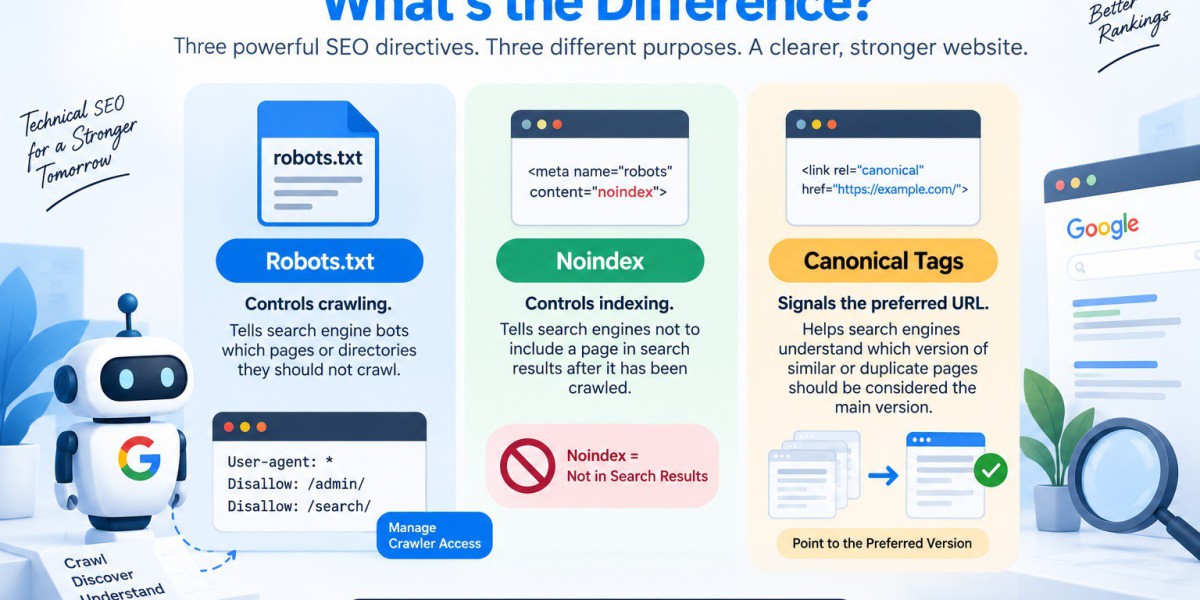
Although all three can influence how search engines handle URLs, they perform completely different jobs. Robots.txt mainly controls crawler access, a noindex tag tells search engines not to include a page in search results, while a canonical tag helps indicate which version of similar or duplicate pages should be treated as the preferred URL.
Understanding the difference between them can help prevent indexing problems, duplicate-content issues and unnecessary crawling.
What Is the Difference Between Robots.txt, Noindex and Canonical Tags?
The simplest way to understand these three SEO controls is to look at the problem each one solves.
Robots.txt is used to manage crawling. It tells search engine crawlers which URLs or directories they should not request.
Noindex is used to control search visibility. It tells search engines that a page should not be included in search results after the directive has been crawled and processed.
Canonical tags are used when multiple URLs contain identical or very similar content. They help search engines understand which URL should be considered the preferred or canonical version.
In short:
- Robots.txt → Controls crawling
- Noindex → Controls indexing
- Canonical tag → Signals the preferred URL
This distinction is at the heart of any Robots.txt vs Noindex comparison.
What Is a Robots.txt File?
A robots.txt file is a text file placed at the root of a website that provides crawling instructions to search engine bots.
For example, a website may use robots.txt to prevent crawlers from accessing certain directories that do not provide useful search content.
User-agent: *
Disallow: /admin/
Disallow: /search/
Here, User-agent: * applies the rule to all crawlers, while Disallow tells them not to request the specified paths.
A robots.txt file can be useful for managing crawl resources, particularly on larger websites with many URLs. Common examples include internal search-result pages, staging areas and certain administrative directories.
However, there is an important limitation: robots.txt is not a reliable method for removing a URL from Google's search results.
If Google discovers a blocked URL through links or other signals, the URL may still appear in search even though Googlebot cannot crawl its content.
What Is Noindex?
A noindex tag tells search engines that a particular page should not appear in search results.
Unlike robots.txt, noindex requires the crawler to access the page so that Google can see and process the directive.
A common implementation is:
<meta name="robots" content="noindex">
This can be useful for pages that need to remain accessible to users or crawlers but should not appear in organic search.
Examples may include:
- Thank-you pages
- Certain internal search-result pages
- Selected low-value pages
- Some duplicate or alternative URLs
- Temporary pages that should not be searchable
The key point is that Noindex controls indexing, not crawling.
For non-HTML resources such as PDFs, an X-Robots-Tag can be used through HTTP response headers to communicate a noindex directive.
What Is a Canonical Tag?
A canonical tag is different from both robots.txt and noindex.
It is used when multiple URLs have the same or substantially similar content and you want to indicate the preferred version.
For example, a product page may be accessible through several URLs:
example.com/product/
example.com/product/?color=blue
example.com/product/?source=campaign
If these URLs contain substantially the same page content, a canonical tag can indicate the preferred URL.
A canonical tag generally looks like:
<link rel="canonical" href="https://example.com/product/">
The canonical signal helps search engines understand which URL you consider the primary version.
It is therefore important not to treat a canonical tag as another form of noindex. A canonical is primarily a URL consolidation signal, while noindex is a directive concerning search visibility.
Robots.txt vs Noindex: Which One Should You Use?
The correct choice depends on your SEO objective.
If your goal is to stop Googlebot from crawling a particular area, robots.txt may be appropriate.
If your goal is to keep a page out of search results while allowing Google to crawl it, noindex is generally the more relevant solution.
If your goal is to tell Google which version of similar URLs you prefer, a canonical tag may be appropriate.
You want to control crawler access
Use Robots.txt.
This can be useful for directories or URL patterns that do not need to be crawled.
You want a page excluded from Google Search
Use Noindex.
The page needs to remain crawlable so Google can see and process the directive.
You have duplicate or similar URLs
Use a Canonical tag.
This helps communicate which URL should be treated as the preferred version.
You have confidential information
Do not rely on robots.txt or noindex.
Use proper authentication and access controls to protect private information.
Can Robots.txt and Noindex Be Used Together?
This is one of the most common technical SEO misunderstandings.
Suppose a page contains:
<meta name="robots" content="noindex">
but the same URL is blocked in robots.txt.
Google may not be able to crawl the page and therefore cannot see the noindex directive.
In other words, you can unintentionally prevent Google from seeing the very instruction you want it to process.
If a page is already indexed and you want to remove it using noindex, the usual approach is to allow crawling, implement noindex and allow Google to recrawl the page.
Once the indexing status changes, crawl restrictions can be considered separately if they are genuinely necessary.
Common Robots.txt and Noindex Mistakes to Avoid
Incorrectly combining these controls can create unexpected SEO problems.
Using Robots.txt to Remove an Indexed Page
Blocking a URL in robots.txt does not guarantee that Google will remove it from search.
Blocking a Noindexed Page
If Google cannot crawl the page, it may not see the noindex tag.
Accidentally Noindexing Important Pages
During website migrations or development, temporary noindex directives can sometimes remain active after launch.
Blocking CSS or JavaScript
Important resources required for rendering should not be unnecessarily blocked.
Keeping Noindexed URLs in the XML Sitemap
Your sitemap should generally focus on URLs you want search engines to discover and index.
Using SEO Directives for Security
Robots.txt and noindex should not be treated as security mechanisms. Private information needs proper access control.
How Can You Check Robots.txt, Noindex and Canonical Tags?
Regular technical checks can help identify configuration problems before they affect organic visibility.
Check the Robots.txt File
Open your website's /robots.txt file and review the current Disallow and Allow directives.
Check whether important pages or resources are accidentally blocked.
Check the Noindex Tag
View the page source and look for a robots meta tag such as:
<meta name="robots" content="noindex">
For PDFs and other supported non-HTML resources, check the HTTP response headers for an X-Robots-Tag.
Check the Canonical
Inspect the HTML source and look for:
<link rel="canonical" href="...">
Make sure the canonical URL points to the intended preferred version.
Use Google Search Console
Google Search Console's URL Inspection tool can help you understand how Google sees a URL, including crawl and indexing-related information.
Why Technical SEO Matters for Your Website
Crawling and indexing problems can affect how efficiently search engines discover and process your website.
A technically strong website requires more than adding keywords to pages. SEO teams also need to understand how crawling, indexing, duplicate URLs and search visibility interact.
The Cogent can help businesses review technical SEO elements such as robots.txt, indexing signals and website architecture as part of a broader SEO strategy.
A proper technical review can identify issues such as accidentally blocked resources, incorrect noindex directives, indexing problems and conflicting URL signals.
Frequently Asked Questions
1. What is the difference between Robots.txt and Noindex?
Robots.txt controls whether search engine crawlers can access a URL, while Noindex tells search engines not to include a crawlable page in search results. They solve different SEO requirements.
2. What is a robots.txt file used for?
A robots.txt file provides crawling instructions to search engine bots. It can help control access to specific directories, URL patterns or areas of a website that do not need to be crawled.
3. What does a Noindex tag do?
A Noindex tag tells search engines not to include a specific page in their search results after the page has been crawled and the directive has been processed.
4. What is a canonical tag in SEO?
A canonical tag helps search engines identify the preferred URL when multiple pages have identical or substantially similar content. It is mainly used to manage duplicate or similar URLs.
5. Can Robots.txt prevent a page from being indexed?
Not reliably. Blocking a URL through Robots.txt prevents crawling, but the URL can potentially still appear in search results if Google discovers it through other signals.
6. Can I use Robots.txt and Noindex on the same page?
Using both on the same URL can create problems because Google may be unable to crawl the page and therefore may not see the Noindex tag. The correct approach depends on the SEO objective.
7. Should I use Noindex or Robots.txt to remove a page from Google?
If the objective is to remove a crawlable page from search results, Noindex is generally the appropriate signal. Robots.txt is primarily designed for controlling crawler access.
8. What is the difference between Noindex and Canonical?
Noindex tells search engines not to show a page in search results, while a canonical tag indicates which URL should be treated as the preferred version among similar URLs.
9. How can I check whether Robots.txt is working correctly?
You can review your website's robots.txt file and check its Allow and Disallow directives. Google Search Console can also help you investigate crawling and indexing behaviour.
10. Can The Cogent help with Robots.txt and technical SEO?
Yes. The Cogent can review technical SEO elements such as crawling, indexing, robots.txt directives and other website configuration issues as part of a broader technical SEO review.
Final Thoughts
Robots.txt, noindex and canonical tags are not interchangeable. Each has a different role in technical SEO.
Use robots.txt when your primary objective is managing crawler access. Use noindex when a crawlable page should stay out of search results. Use a canonical tag when multiple similar URLs need a preferred version to be identified.
Understanding the difference between these three signals is essential for maintaining a healthy website architecture and avoiding common indexing mistakes.
If you are unsure whether a URL should be blocked, noindexed or canonicalized, review the actual SEO objective first rather than applying a directive simply because it seems convenient. The Cogent can help businesses review their technical SEO setup and identify crawling and indexing issues that may otherwise remain difficult to diagnose.






